


WhoFundsWho is the browser extension that instantly shows you who funds the experts, politicians, think tanks, NGOs and other organizations and people that you are reading about.
(latest version: March 13, 2025)
To get started with WhoFundsWho, install it from the Chrome Web Store where it has earned a Featured badge:
The Featured badge is assigned to extensions that follow our technical best practices and meet a high standard of user experience and design. Chrome team members manually evaluate each extension before it receives the badge…
If you prefer manual installation from outside the Web Store, just download the zip file or crx file from Github and follow the instructions.
Mobile
WhoFundsWho is also available as an add-on in the Microsoft Edge Add-ons store. And this availability allows you to use WhoFundsWho on mobile Android devices. For instructions on how to do that, see this page.
An iOS and MacOS version of WhoFundsWho is currently being tested.
What is WhoFundsWho?
There is an old joke about making politicians wear their sponsors’ logos on their suits, like NASCAR drivers do. That way we would instantly know which special interests may be benefiting from the policies advocated by a politician.
The same goes for the experts that appear in the media to explain foreign policy, public health, the economy and so on to the public.
For example, if a foreign policy expert argues that instead of facilitating peace negotiations we should send more weapons to a conflict zone it may well be relevant to know that the think tank she works for is funded by defense contractors.
Although you can typically find this kind of sponsorship information if you do some investigating online, as a reader you don’t want to have to do the research for every person and organization that you’d like to know more about.
That’s why it would be so helpful if the experts and politicians wore sponsor logos on their suits. But that’s obviously not going to happen.
Well, WhoFundsWho does the next best thing:
We did the research for you and compiled a database with funding information for tens of thousands of experts, politicians and organizations.
Next we created a browser extension that automatically presents this information to you exactly when it is most relevant to you, i.e. when you are reading about them.




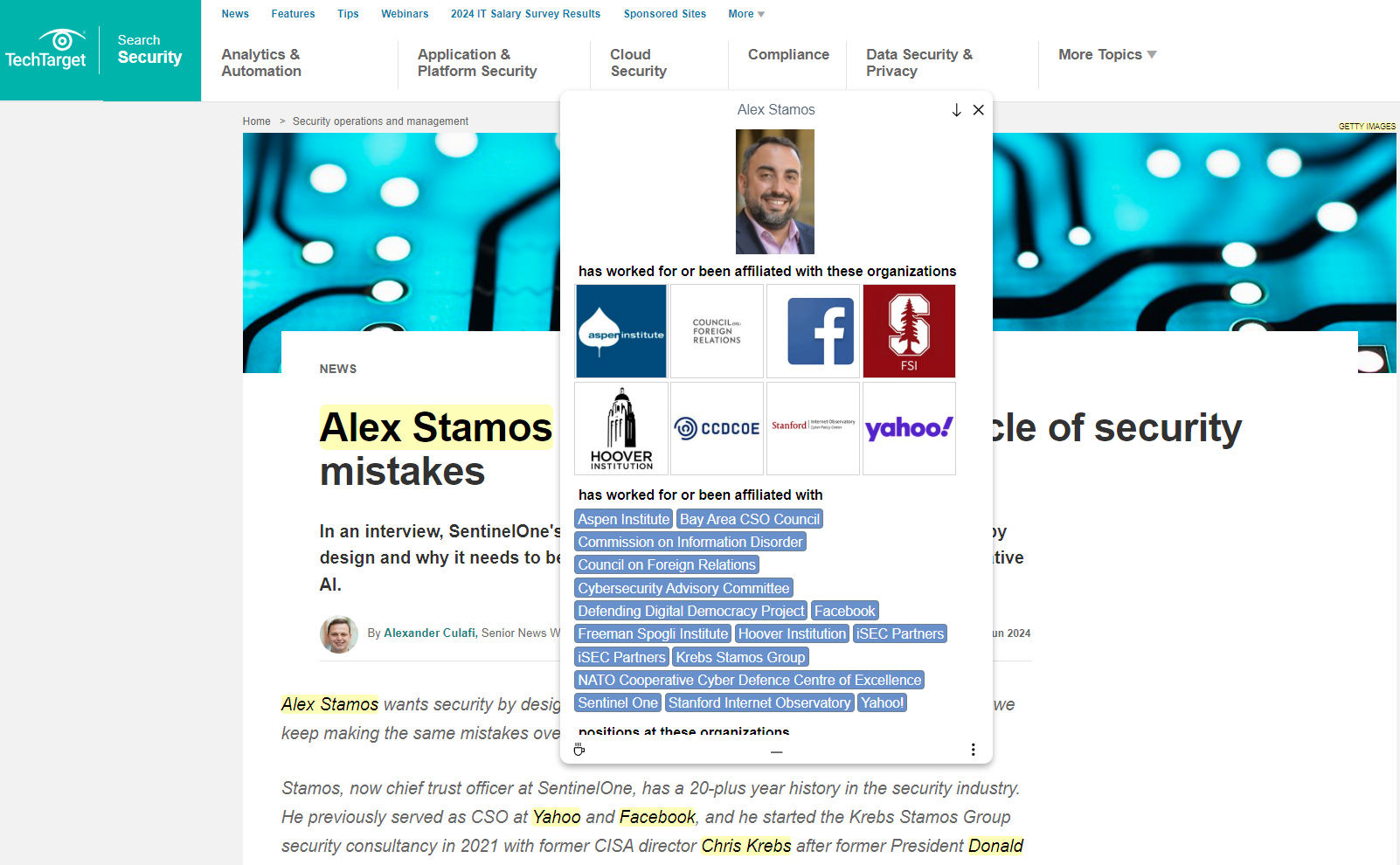
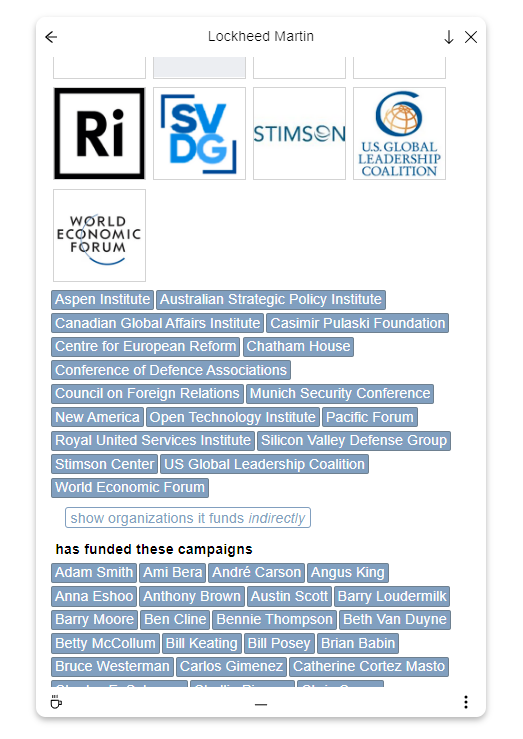

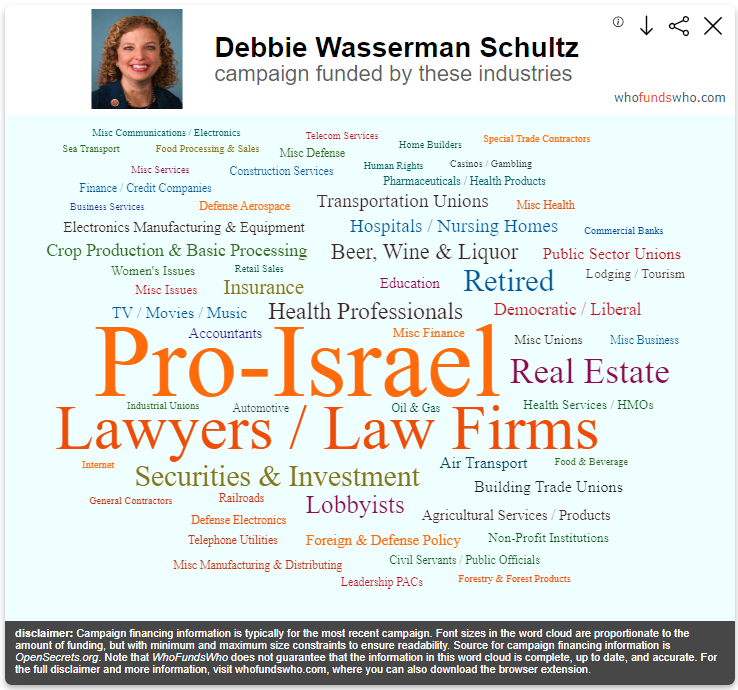
Here’s how it works: When you open a webpage to read an article or browse a news site, in the background WhoFundsWho checks whether any of the names in the database are on the webpage.
If so, it highlights those names to draw your attention. When you then click on or hover over the highlighted name, a popup appears that tells you who is funding that person or organization.
And it is not just financial information that WhoFundsWho can provide you with. It can also tell you:
- what other organizations a person has worked for
- how an organization is related to other organizations
- who their parent or child organizations are
- who they partner with
- what networks they are a member of
- and more
For example, you can ask WhoFundsWho to highlight the names of every person and politician that has some kind of formal affiliation with the World Economic Forum. Here’s what that looks like when you then visit a page that lists the members of the current Canadian government:
For more information about WhoFundsWho, see the FAQ. Troubleshooting? Click here.
Why WhoFundsWho?
Although the WhoFundsWho database is only in its early stages, it already contains information about many tens of thousands of organizations and people. But it is by no means complete or exhaustive.
Think of the database as Wikipedia in its early years: Already useful but with tremendous potential for further growth.
Our goal is for WhoFundsWho to become an indispensable tool that reveals to users the otherwise hidden connections that exist between the organizations and people that shape public opinion and policy.
And you can help make this happen:
- by sending comments, suggestions, questions, criticisms and other kinds of feedback
- by correcting any errors you may come across in the data the extension presents to you
- by sending us new information or sources about funding and other types of connections that we can add to the database
- by evaluating or contributing to the code
To get in touch, you can fill out the contact form to get in touch, send an email at support@whofundswho.com or follow us on Twitter: @whofundswho.
You can also help by spreading the word and telling others about WhoFundsWho.
Lastly, although we try to automate as much as possible it is still true that many many hours go into doing the research, homogenizing and processing the data, building the database, and designing, testing and improving the extension.
If you find that WhoFundsWho provides a valuable service to you, please consider making a donation to support our work and help us sustain, improve and expand the project.
 WhoFundsWho